
Download xGrab – Fast, Free Screen Recording Tool for Windows & macOS
Overview
xGrab is a lightweight screen‑recording utility designed for users who need to capture desktop activity in a flash. Unlike heavyweight video editors, xGrab focuses on speed, simplicity, and reliable compression. The moment you launch the app, it begins monitoring every mouse click, keyboard stroke, and window change, storing the footage in a tightly compressed movie file through an efficient double‑buffering technique.
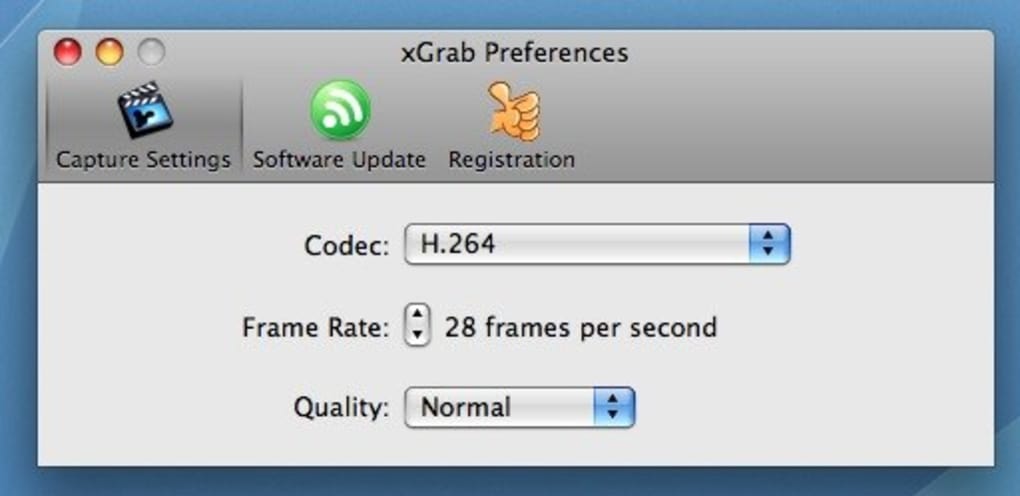
This makes it ideal for quick troubleshooting demos, short tutorials, or any situation where you must show exactly how an error occurs on your screen. Although the settings panel is intentionally minimal, it still offers enough control to choose between full‑screen or a custom resolution, set the frame rate, and pick from a surprisingly wide array of codecs. Six quality presets let you balance file size against visual fidelity, ensuring that the resulting video is both smooth and clear.
The interface is uncluttered, with a single “Record” button that starts capturing within seconds, and a “Stop” button that finalizes the file instantly. Because xGrab automatically compresses the footage while recording, you avoid the post‑processing step that many other tools require. Whether you’re a developer, educator, or casual user, xGrab delivers a fast, secure, and free way to create screencasts without the learning curve of professional software.
Core Features & How to Record
Feature Highlights
- Instant screen monitoring with double‑buffered compression.
- Two output modes: full‑screen or custom resolution (adjust width & height).
- Six quality levels ranging from low‑size to high‑definition.
- Support for multiple codecs, including H.264, VP8, and MJPEG.
- Adjustable frame rates from 15 fps up to 60 fps.
- One‑click start/stop workflow for rapid captures.
- Automatic file naming and organization in the default “Videos” folder.
- Lightweight footprint – runs smoothly on older hardware.
Step‑by‑Step Recording Guide
Getting started with xGrab is as easy as installing the program and pressing a button. After downloading the installer (available for Windows 10/11 and macOS 10.13+), run the setup and follow the on‑screen prompts. Once installed, launch xGrab from the desktop shortcut or the start menu.
The main window displays a large red “Record” button; clicking it begins a 3‑second countdown that lets you arrange your screen before capture starts. During recording, a tiny overlay shows the elapsed time and current resolution. To stop, simply click the “Stop” button in the same overlay or press the predefined hotkey (default Ctrl + Shift + R).
The software then finalizes the video, applying the selected codec and quality preset, and saves the file automatically. You can immediately open the video with your default media player or share it via email, cloud storage, or collaboration platforms. For users who need a custom size, select “Fixed” mode before recording, input the desired width and height, and confirm.
The intuitive design eliminates the need for complex configuration files or command‑line arguments, making xGrab an excellent choice for anyone who wants a reliable screencast in seconds.
System Compatibility, Pros & Cons, and Frequently Asked Questions
xGrab runs natively on both Windows and macOS. The Windows version supports 64‑bit systems from Windows 10 onward, while the macOS build works on macOS 10.13 (High Sierra) and newer. No additional runtimes such as Java or .NET are required, and the installer includes all necessary libraries. The application uses hardware‑accelerated encoding when available, ensuring smooth performance even on modest laptops.
Pros
- Fast, one‑click recording with virtually no setup time.
- Highly efficient compression reduces file size without major quality loss.
- Wide codec selection gives flexibility for different workflows.
- Low system resource usage – ideal for older PCs.
- Free for personal and commercial use.
Cons
- Limited advanced settings – no audio capture or webcam overlay.
- Only two resolution modes; no multi‑monitor selection.
- Missing built‑in video editor for quick trimming.
- Interface may feel too minimal for power users.
FAQ
Is xGrab completely free?
Yes, xGrab is offered as a free download for both personal and commercial use. There are no hidden fees or premium upgrades.
Can I record system audio or microphone input?
The current version of xGrab focuses on video only and does not capture audio streams. Users who need sound must combine the video with an external audio recorder.
Which codecs are supported?
xGrab includes H.264, VP8, MJPEG, and a few legacy codecs. The choice is presented in the settings panel before you start a recording.
How does the double‑buffering compression work?
Double buffering captures frames in a secondary buffer while the primary buffer is being written to disk. This overlap reduces dropped frames and keeps the recording smooth, especially at higher frame rates.
Is there a portable version that doesn’t require installation?
A portable zip package is available on the official download page, allowing you to run xGrab from a USB stick without modifying the host system.
Final Verdict & Call to Action
In a landscape crowded with feature‑heavy screen recorders, xGrab stands out by stripping the experience down to what matters most: speed, simplicity, and reliable compression. If you need to capture a fleeting error, demonstrate a quick workflow, or create a short tutorial without wrestling with endless settings, xGrab delivers exactly that. Its modest feature set—full‑screen or fixed resolution, a handful of quality levels, and a robust codec library—covers the majority of everyday use cases while keeping the program lightweight and responsive.
The lack of audio support and advanced editing tools may deter power users, but for most developers, educators, and support technicians, those omissions are a reasonable trade‑off for a free, instantly usable tool. Because it runs on both Windows and macOS and offers a portable version, you can keep xGrab on hand across multiple machines, ensuring you’re always ready to record. Download xGrab today, test its rapid capture capabilities, and experience how a no‑frills screencasting app can boost your productivity without costing a dime.
Pros: Fast start‑up, excellent compression, free, low CPU usage.
Cons: No audio, limited resolution options, no built‑in editor.







